wiretight lookup B003
B003 board set
You scanned a WireTight B003 board. Here's what it fits, how each board is wired, and how to install it.
3D view
The B003 set seated on an Arduino® Opta™ Ext A0602, shown with Micro-Fit headers. Drag to rotate, scroll or pinch to zoom. Pick a board to see it on its own, or lift the boards off the terminals.
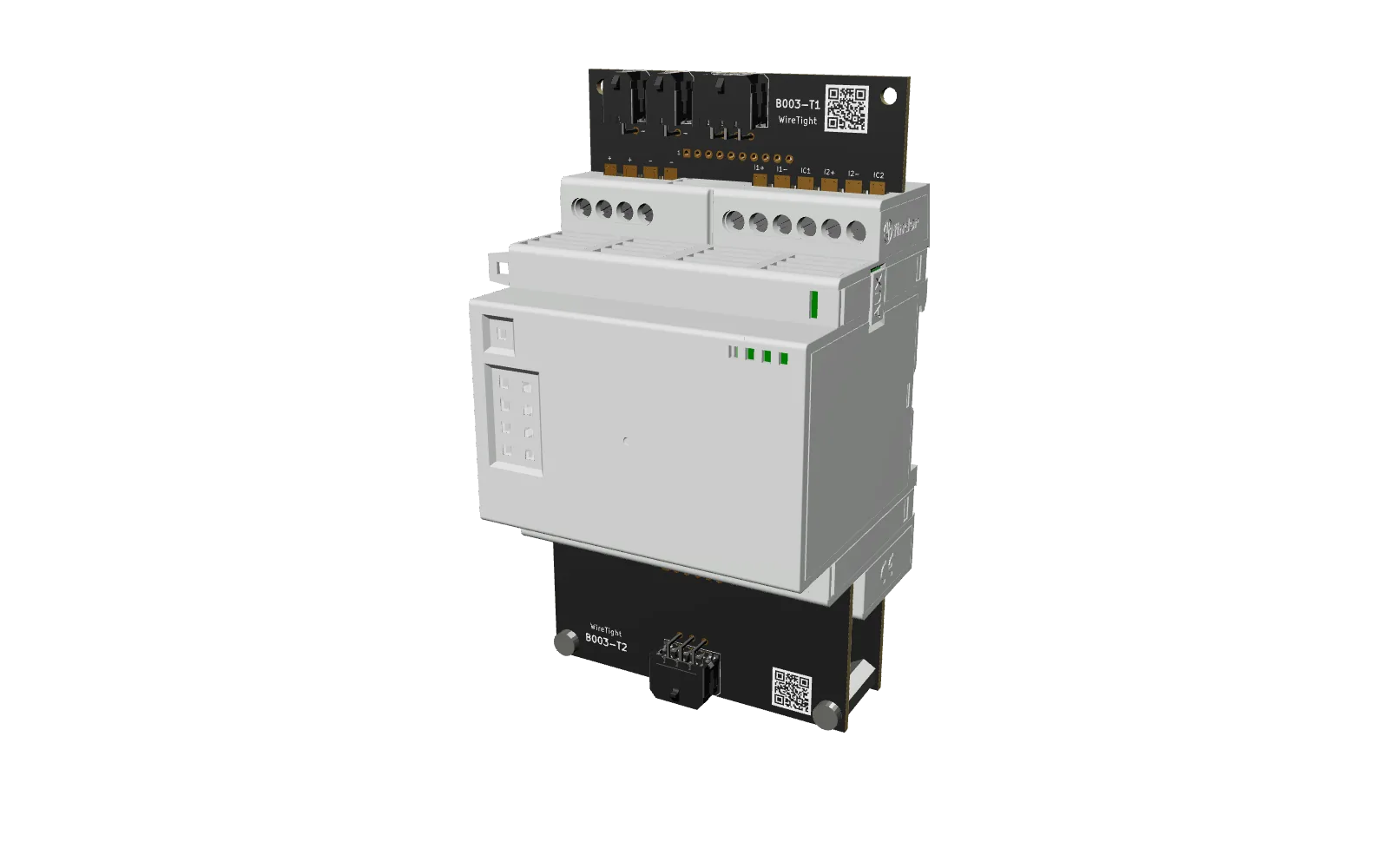
loading 3D model… (4 MB)
Module 3D model © Arduino S.r.l., from docs.arduino.cc, licensed CC BY-SA 4.0; converted to glTF, simplified and combined with WireTight board models. This 3D model and its renders are shared under the same license.
Three boards
The analog expansion has one terminal row on top and two on the bottom. Boards are numbered from the top down.
| Board | Terminal row | Covers | Micro-Fit header |
|---|---|---|---|
| T1 | Top | + + − −, analog channels 1–2 | 2× 2×1 (power) + 2×3 |
| T2 | Bottom, front | PWM outputs 1–4, VPWM, − | 2×3 |
| T3 | Bottom, back | Analog channels 3–6, analog outputs 1–2 | 2×6 |
T2 bolts to T3 through the two corner holes, using M3 standoffs (included in the Full Kit). The bare kit has a row of plated 2.54 mm (0.1″) holes instead of a header. Hole 1 is marked on the board. Any 2.54 mm connector fits. Every terminal has its own pin, including each channel's −, so every channel gets its own return wire.
T1 · top board
Supply and analog channels 1–2. 10 positions. Two identical 2×1 power headers: one for the supply in, one to pass it on.
| Module terminal | Signal | Bare hole | Micro-Fit pin |
|---|---|---|---|
| + | Supply + (12–24 V DC) | 1 | Power, pin 1 |
| + | Supply + (12–24 V DC) | 2 | Power, pin 1 |
| − | GND | 3 | Power, pin 2 |
| − | GND | 4 | Power, pin 2 |
| I1+ | Analog channel 1, + | 5 | Analog 2×3, pin 1 |
| I1− | Analog channel 1, − | 6 | Analog 2×3, pin 2 |
| IC1 | Channel 1, 3rd RTD wire | 7 | Analog 2×3, pin 3 |
| I2+ | Analog channel 2, + | 8 | Analog 2×3, pin 4 |
| I2− | Analog channel 2, − | 9 | Analog 2×3, pin 5 |
| IC2 | Channel 2, 3rd RTD wire | 10 | Analog 2×3, pin 6 |
On each power header, pin 1 (+) is the row away from the module and pin 2 (−) is the row nearest it. Feed it from the module to the left with the power jumper (included in the Full Kit), and pass power on from the other header. For RTDs, use 3-wire connections on channels 1–2 (IC1 / IC2) to cancel lead resistance; on 2-wire RTDs the board adds about as much resistance as 2 m of field wire.
T2 · bottom front board
PWM outputs. 6 positions. Stacks on T3. The header is mounted the other way up, so pin 1 is P4+.
| Module terminal | Signal | Bare hole | Micro-Fit pin |
|---|---|---|---|
| P1+ | PWM output 1 | 1 | 6 |
| P2+ | PWM output 2 | 2 | 5 |
| VPWM | PWM supply (8–24 V DC) | 3 | 4 |
| − | GND | 4 | 3 |
| P3+ | PWM output 3 | 5 | 2 |
| P4+ | PWM output 4 | 6 | 1 |
T3 · bottom back board
Analog channels 3–6 and analog outputs 1–2. 12 positions. The header is mounted the other way up, so pin 1 is O2−.
| Module terminal | Signal | Bare hole | Micro-Fit pin |
|---|---|---|---|
| I3+ | Analog channel 3, + | 1 | 12 |
| I3− | Analog channel 3, − | 2 | 11 |
| I4+ | Analog channel 4, + | 3 | 10 |
| I4− | Analog channel 4, − | 4 | 9 |
| O1+ | Analog output 1, + | 5 | 8 |
| O1− | Analog output 1, − | 6 | 7 |
| I5+ | Analog channel 5, + | 7 | 6 |
| I5− | Analog channel 5, − | 8 | 5 |
| I6+ | Analog channel 6, + | 9 | 4 |
| I6− | Analog channel 6, − | 10 | 3 |
| O2+ | Analog output 2, + | 11 | 2 |
| O2− | Analog output 2, − | 12 | 1 |
Install
- Power down the module, the Opta it's attached to, and everything they switch.
- Seat T1 and T3. Put T1 on the top row and T3 on the bottom back row, tighten each terminal, then screw two standoffs onto T3.
- Add T2. Seat it on the bottom front row, screw it to the standoffs, and tighten each terminal. Check the pinouts above before plugging in and powering up.
Get the kit
Each B003 kit covers every board: bare, with Micro-Fit headers, or the full kit with standoffs. Ask about volume pricing and pre-built harnesses.
Shop B003 kits