wiretight lookup B001
B001 board set
You scanned a WireTight B001 board. Here's what it fits, how each board is wired, and how to install it.
Fits
| Unit | Arduino SKU | B001 |
|---|---|---|
| Arduino® Opta™ RS485 | AFX00001 | compatible |
| Arduino® Opta™ WiFi | AFX00002 | compatible |
| Arduino® Opta™ Lite | AFX00003 | compatible |
The Arduino SKU is printed on your unit's label. Expansion modules use different boards: D1608E / D1608S use B002.
3D view
The B001 set seated on an Arduino® Opta™ WiFi, shown with Micro-Fit headers. Drag to rotate, scroll or pinch to zoom. Pick a board to see it on its own, or lift the boards off the terminals.
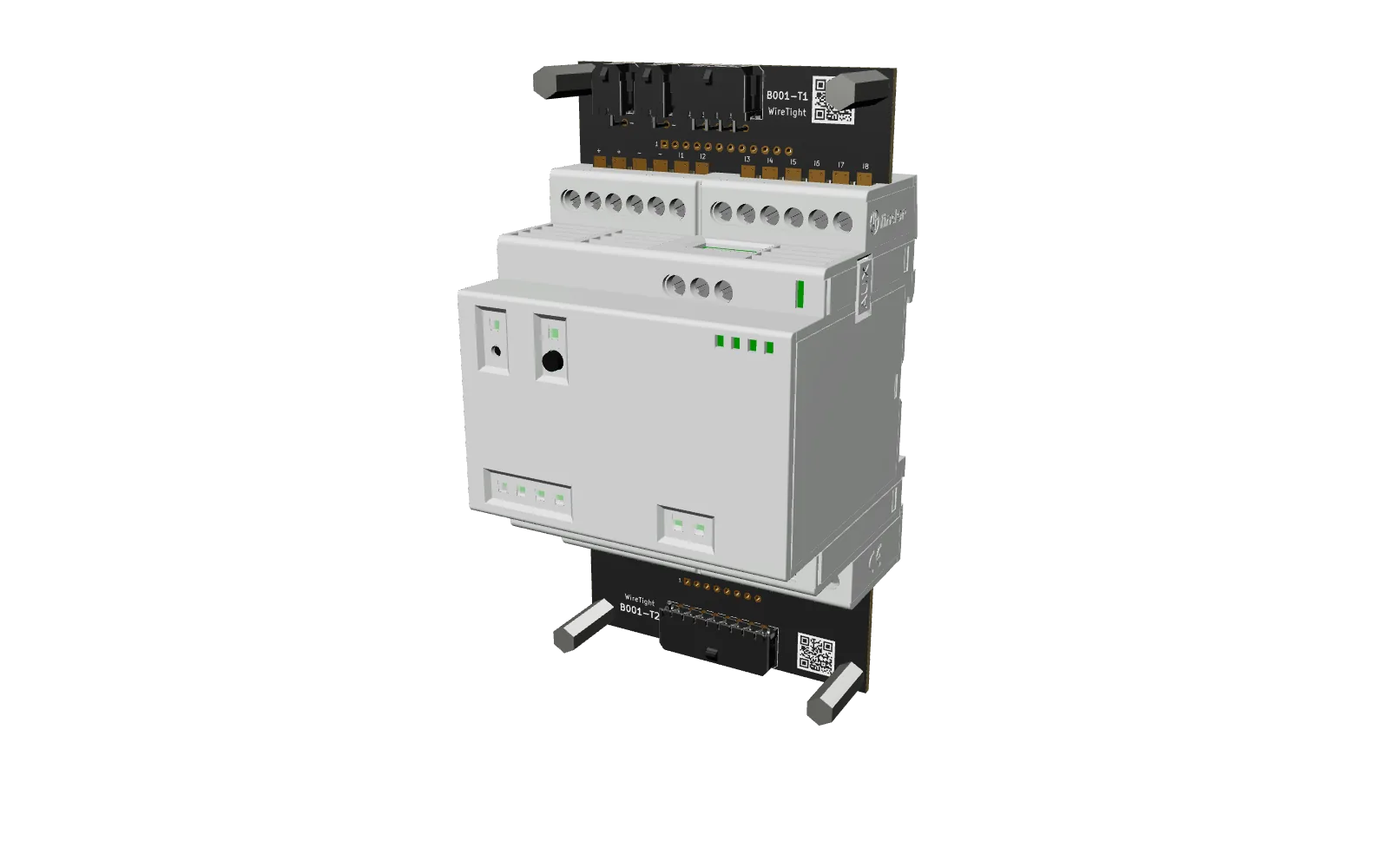
loading 3D model… (3 MB)
Module 3D model © Arduino S.r.l., from docs.arduino.cc, licensed CC BY-SA 4.0; converted to glTF, simplified and combined with WireTight board models. This 3D model and its renders are shared under the same license.
T1 · top board
Seats on the top terminal row: supply and inputs I1–I8. 12 positions in two blocks of six. Two identical 2×1 power headers: one for the supply in, one to pass it on.
| Opta terminal | Signal | Bare hole | Micro-Fit pin |
|---|---|---|---|
| + | Supply + (12–24 V DC) | 1 | Power, pin 1 |
| + | Supply + (12–24 V DC) | 2 | Power, pin 1 |
| − | GND | 3 | Power, pin 2 |
| − | GND | 4 | Power, pin 2 |
| I1 | Input 1 | 5 | Input 2×4, pin 1 |
| I2 | Input 2 | 6 | Input 2×4, pin 2 |
| I3 | Input 3 | 7 | Input 2×4, pin 3 |
| I4 | Input 4 | 8 | Input 2×4, pin 4 |
| I5 | Input 5 | 9 | Input 2×4, pin 5 |
| I6 | Input 6 | 10 | Input 2×4, pin 6 |
| I7 | Input 7 | 11 | Input 2×4, pin 7 |
| I8 | Input 8 | 12 | Input 2×4, pin 8 |
On each power header, pin 1 (+) is the row away from the Opta and pin 2 (−) is the row nearest it. To power an expansion module, run a power jumper (WT-PJ-150) from the second header to the expansion's T1.
T2 · relay board
Seats on the bottom terminal row: relay outputs 1–4. 8 positions. DC loads only: up to 5 A per channel, 30 V max. The header is mounted the other way up, so pin 1 is relay 4, contact B.
| Opta terminal | Signal | Bare hole | Micro-Fit pin |
|---|---|---|---|
| Relay 1 | Output 1, contact A | 1 | 8 |
| Relay 1 | Output 1, contact B | 2 | 7 |
| Relay 2 | Output 2, contact A | 3 | 6 |
| Relay 2 | Output 2, contact B | 4 | 5 |
| Relay 3 | Output 3, contact A | 5 | 4 |
| Relay 3 | Output 3, contact B | 6 | 3 |
| Relay 4 | Output 4, contact A | 7 | 2 |
| Relay 4 | Output 4, contact B | 8 | 1 |
Install
- Power down the Opta and everything it switches.
- Seat the board on its terminal row (T1 on top, T2 on the bottom) and tighten each terminal once.
- Plug in your harness. Check the pinout above before powering up.
Get the kit
Each B001 kit covers every board: bare, with Micro-Fit headers, or the full kit with standoffs. Ask about volume pricing and pre-built harnesses.
Shop B001 kits